EtymoRead: AI Etymology
Reading Assistant
Read web pages and PDFs with instant offline etymology highlights. Leverage Chrome's native, on-device Gemini Nano AI for context-aware word deconstructions—100% private and offline.

EtymoRead
v1.0.0 • Offline ActiveExperience EtymoRead in Action
Hover over the highlighted words to trigger the local database lookup, or select a word to simulate on-device AI deconstruction.
How the Hover Logic Works
The core extension database contains over 600 roots and affixes. When you hover over a highlighted word, it loads the match in under 200ms. No network requests are made, keeping your browsing experience fast and fluid.
Core Capabilities
Instant Hover Etymology
Hover over highlighted roots, prefixes, or suffixes. Get immediate linguistic definitions, cognates lists, and historical origins in 200ms.
On-Device Gemini Nano
Double-click any vocabulary word to invoke Chrome's native Prompt API. The local LLM performs context-aware morphological breakdowns.
100% Privacy & Offline
All definitions and AI models run locally in your browser memory sandbox. Zero network telemetry. Absolute security for your browsing data.
Professional PDF Viewer
Drag and drop local PDFs or intercept web load events. Enjoy CJK glyph rendering, smooth scrolling, and complete keyboard navigation.
Anti-Overmatching Filter
Smart rule engine filters out common stop words and requires affix-to-root coherence, reducing visual noise to highlight high-value roots.
Manifest V3 Compliant
Built on modern Chrome Extension architectures, utilizing secure declarative redirect policies and background service workers.
Extension Interface Screenshots
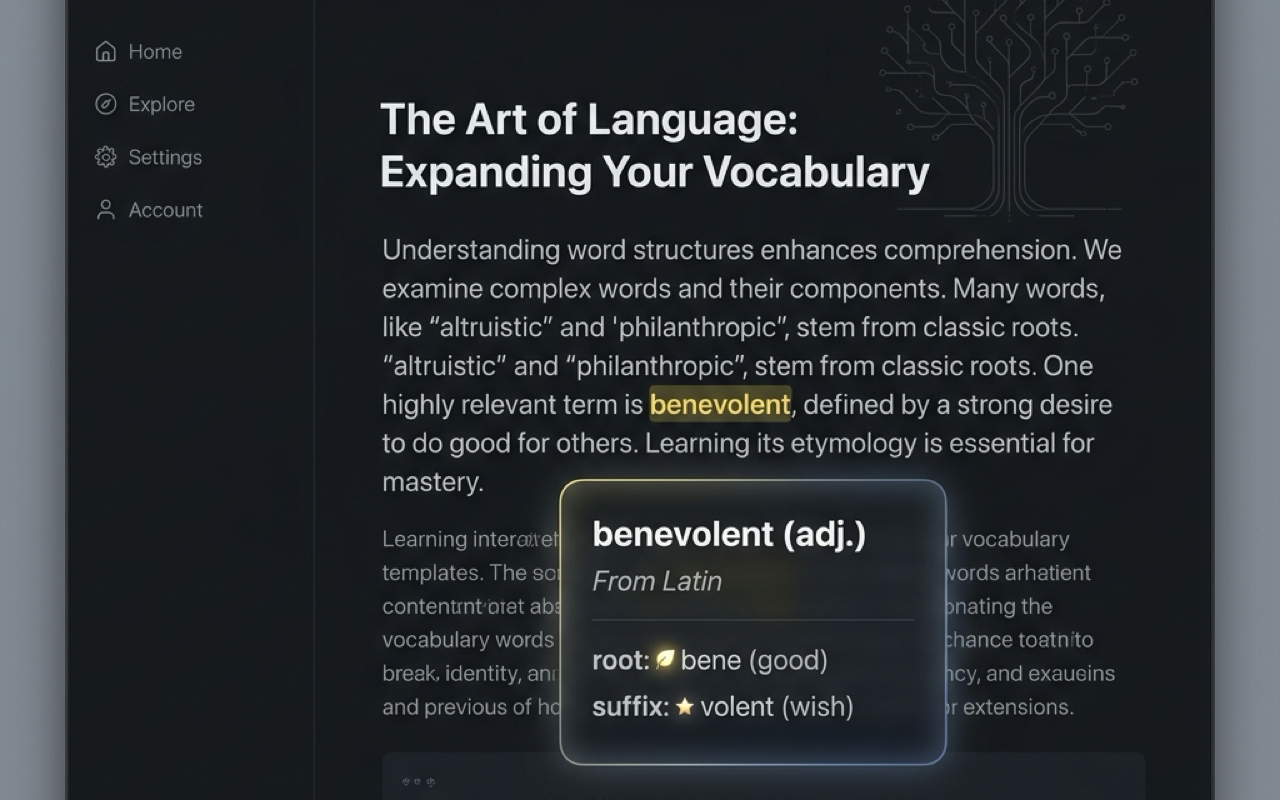
1. Highlight hover cards on online articles
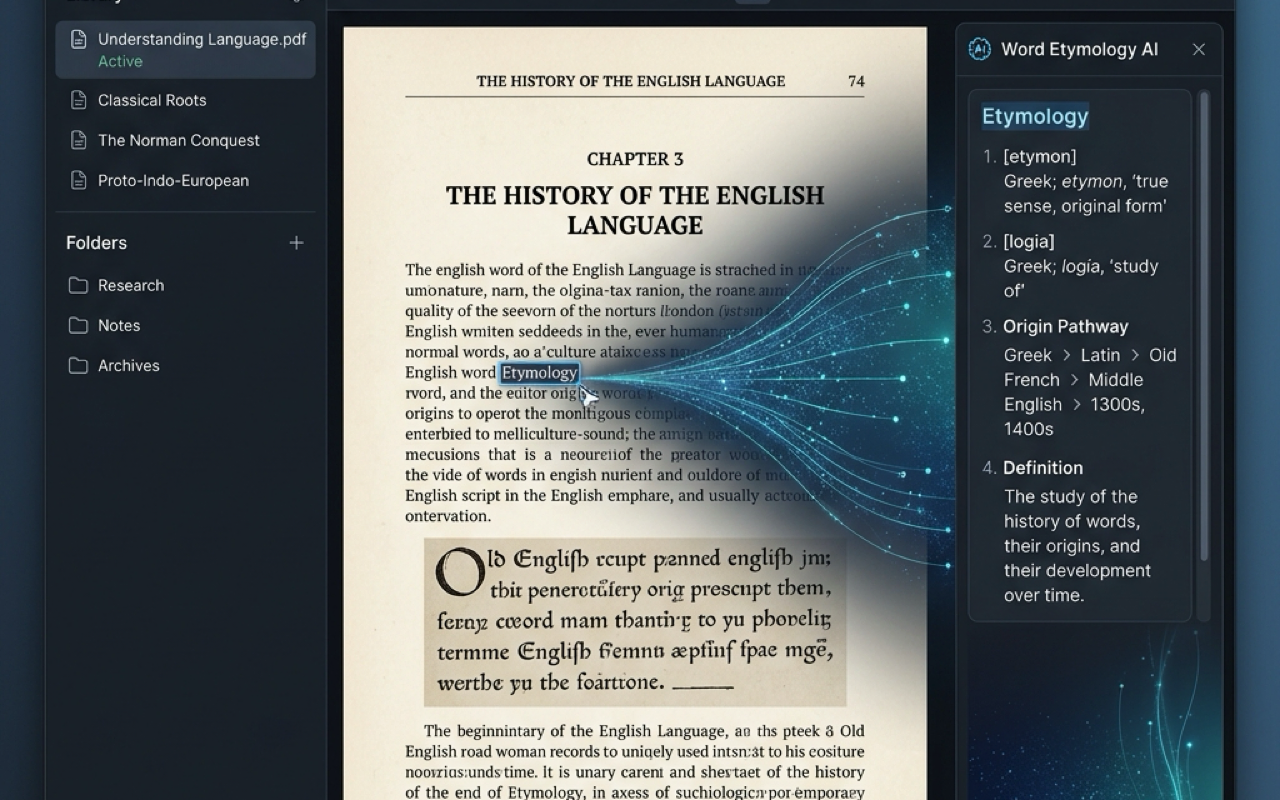
2. Integrated offline PDF reader & AI deconstruction
Chrome Local AI (Gemini Nano) Setup
To use the double-click AI deconstruction features, you need to configure your Google Chrome environment to enable on-device Large Language Models. Follow these simple steps:
Verify Chrome Version
Make sure you are running Google Chrome version **130** or higher. Check this in Chrome Menu > Help > About Google Chrome.
Enable Optimization Guide Flags
Navigate to chrome://flags in your address bar.
Search for "Enables optimization guide on device model" and set it to Enabled BypassPrefRequirement.
Enable Prompt API
Still in chrome://flags, search for "Prompt API for Gemini Nano" and select Enabled.
Click the **Relaunch** button at the bottom of the flags page to apply changes.
Download the Model Component
Navigate to chrome://components.
Locate the entry named **"Optimization Guide On Device Model"** and click **"Check for update"**. Wait for the status to show "Up-to-date" (the browser will download the model in the background, which is around 1.5GB).
Toggle AI in Popup Settings
Click the EtymoRead extension icon in your Chrome toolbar, click the settings cog, and toggle the **"Enable Local AI"** button to start double-clicking!
Support & FAQs
No, you do not. EtymoRead is designed to operate 100% offline. The word-root engine queries a packaged SQLite/JSON dictionary, and the Gemini Nano AI is processed completely in your hardware RAM via Chrome flags, ensuring your learning is network-independent.
Privacy Policy
Last Updated: June 2026
1. Personal Information Collection
EtymoRead does not collect, record, transmit, or share any personal identity information, browsing history, webpage content, or reading logs. We have zero telemetry tracking.
2. On-Device Local Processing
All vocabulary scans, word deconstruction tasks, and linguistic lookups are executed 100% locally inside your browser sandbox. The Gemini Nano AI analysis utilizes Chrome's on-device Prompt API. No data is sent over the internet or transmitted to any external servers.
3. Third-Party Services
EtymoRead does not integrate with any third-party APIs, analytics platforms, tracking scripts, or advertising brokers.
4. Permission Disclosures
- declarativeNetRequest & webNavigation: Used solely to redirect local and web-based PDF files to our offline rendering page.
- storage: Used solely to persist user configurations, such as toggled state preferences.
Ready to Read Smarter?
Install EtymoRead now to decode prefixes, suffixes, and Latin/Greek roots in web pages and PDFs completely offline.